“Customer Loyalty & Memberships module for CRM SYSTEM” Documentation by “Applify Technologies”
“Customer Loyalty & Memberships module for CRM SYSTEM”
Created: 2023-01-08
By: Applify Technologies
Email: crm@applify.com.my
Table of Contents
How to use Customer Loyalty & Memberships module - top
- First, you go Configurations: Loyalty -> Configurations: If you check checkbox Enable loyalty,
When a customer finishes paying an invoice they will receive points according to the loyalty program you create.

Second, you go to create card: Loyalty -> Configurations -> Membership card templates -> New Card You can choose picture of card, select information will be display in client screen and clolor for this infor.
List of card templates:
- Create new Loyalty program: Enter the required information in 3 tabs: Loyalty -> Loyalty program -> New
-Tab General Infor: You need enter name of loyalty program, Minium point to redeem (The minimum number of point a customer must have to apply the program), Start date, End date (Period of application), Customer or customer group are applicable.
-Tab Point calculation: You need select Rule base (Card total, Product category, Product), enter minium purchase (minimum amount of bill to apply the program).
+ With rule base Product: Client will receive points corresponding to each product in the invoice.
+ With rule base Product category: Client will receive points corresponding to each product of product category in the invoice.
+ With rule base Card total : Client will receive points corresponding to the total bill value.


-Tab Redemp calculation: You need select Redeem type(Full, Partial), check checkbox Redeem in Portal(Omni sales Module) if you want customer can redeem their point to discount in Portal, check checkbox Redeem in POS(Omni sales Module) if you want customer can redeem their point to discount in POS and fields to config redemption rules.
+ With redeem type Full: Customers will only be able to redeem all of their points at a time.
+ With redeem type Partial: Customers will be redeemed a portion of their points in 1 time.
+ Minium point to redeem: The minimum number of points a customer needs to achieve in order to redeem points.
+ Max amount received: The maximum amount value that customers receive when redeeming points is based on the total value of the order.
+ Point from, Point to: Customers have points from "Point from" to "Point to" this redemption rule will apply.
+ Point weight: The discount amount received = (Customer point)*(Point weight). EX: If you want 100 points corresponds to 1 USD. You can enter Point weight of 0.01,... Loyalty program detail
 List loyalty programs
- You can filter loyalty programs by redeem type and rule base in this screen.
List loyalty programs
- You can filter loyalty programs by redeem type and rule base in this screen.

- Create new Membership rules Loyalty -> Memberships -> Membership rules -> New
- You can enter the name of rank (Ex: VIP, SILVER, GOLD, PLATIUM, DIAMOND,....), select Customer group, customer is applicable, select the card, enter Point from, Point to.
- The customers who belong to the customer group you choose and have scores in the range from "Point from" to "Point to" will be applied this membership rules and benefit from membership program.

List Membership rules
- You can filter membership rules by customer group and customer in this screen.
- Create new membership program: Loyalty -> Memberships -> Membership programs
- You need enter infor of Membership program: Name, Discount type(Card total, Product category, Product) like to loyalty program, Membership rule( rank is applicable), Point from and Point to(point is applicable). - Customers have rank(membership rule) belongs to the membership rules you choose and have a score in the range from "Point from" to "Point to" will benefit from this program. (Discount & voucher).
+ With type card total: You can enter discount amount that the customer gets reduced. Apply on the total value of the order.
+ With type product category: You can choose product category and enter corresponding discount percent.
+ With type product: Like to product category type. You can choose product and enter corresponding discount percent. Tab Voucher infor You need to enter the infor of voucher: Voucher code(Client use to enter in Portal & POS - Omni sales Module), Type (Reduced by % or Reduced by amount), Voucher value (amount or percent discount), Minium purchase(minium order value is applicable).
 List Membership programs:
- Menu transations: Loyalty -> Transations -> Transations
The list of loyalty point incurred history.
You can give points to customers in this menu Loyalty -> Transations -> Transations -> New
- You need to choose customer receives points, enter Loyalty point and choose Action(Credit or Debit).
The list of redeem point history of customers. You can filter histiory by customer. View the invoice, Old point, New point of customer when their redeem point
- Menu Users: Loyalty -> Users
- This menu display users(Customers) details, their current point and rank, help you more convenient in managing and taking care of customers.
- You can filter users(Customers) by customer groups and customer in this screen.
- You can view their transation when click eye icon in column actions.
- Client area: Memberships
Customer can view their point, rank and next rank. Their card is also shown here.
They can view their transations, promotions, and redeemlog.
In tab Promotions, they can view their history point redeem, related invoice.
In tab Redeem log, they can view voucher code, period, list program and the benefits they get from that program.
- You can filter membership programs by discount type and membership rules in this screen.

Membership programs detail:

B) Integration with Omni-channel sales module
- Portal in client area When client order items, their can redeem point to discount.
- When customers make purchases on the portal. If they qualify to perform the score they can redeem points for discounted value here.
- They can redeem point by enter the point they want to redeem to field redeem from and click button redeem.
- Their products or invoices will also receive discounts according to the membership program they are enjoying.
- Alternatively, they can enter a voucher for a discount.
- POS When client order by POS, their can redeem point to discount.
- When customers make purchases on the POS. Similar to the portal. You can enter the point they want to redeem to field redeem from and click button redeem. But you need to choose customer before enter redeem from.
- Their products or invoices will also receive discounts according to the membership program they are enjoying like to Portal.

- They also can enter a voucher for a discount.

C) Redeem directly on Invoice without going through Sales Order of Omni-channel Sales module
- You need to add hooks for Perfex CRM: please refer to the details in the Instructions to add hook to redeem on invoice.docx file.
- Redeem on Client Portal's Invoice
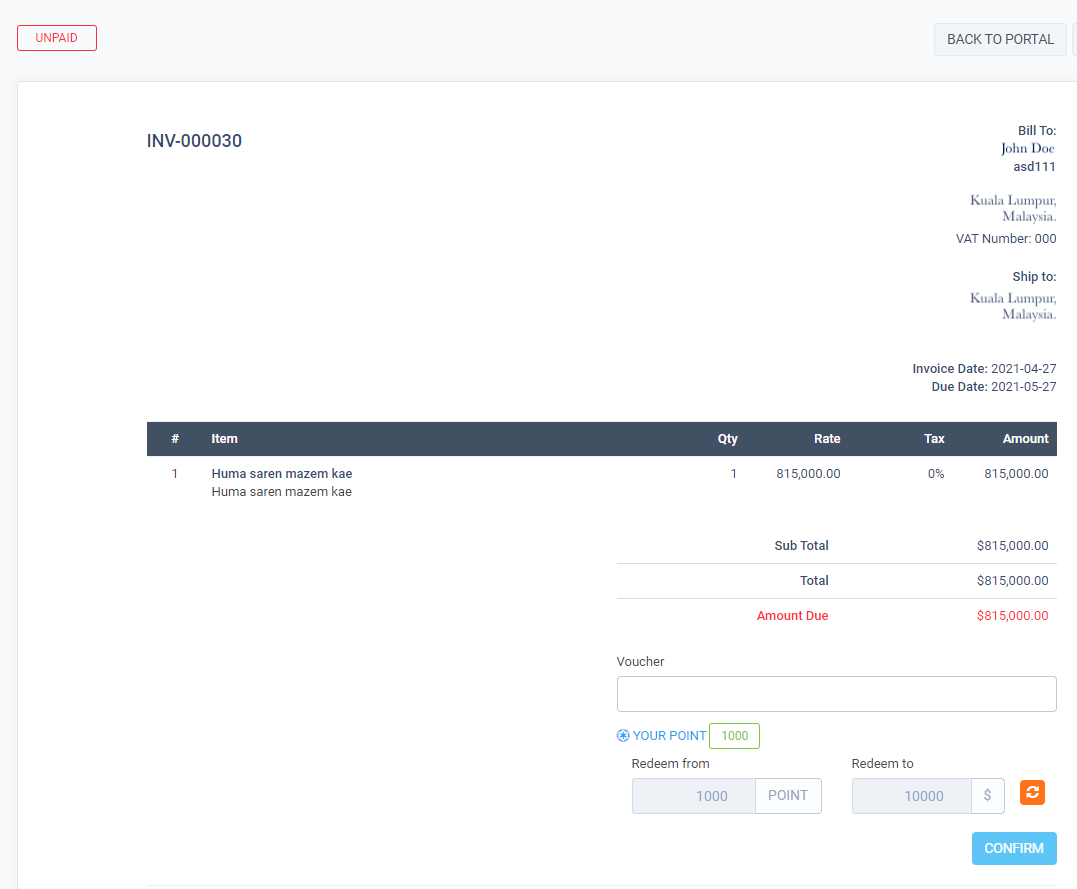
- Redeem on company Invoice
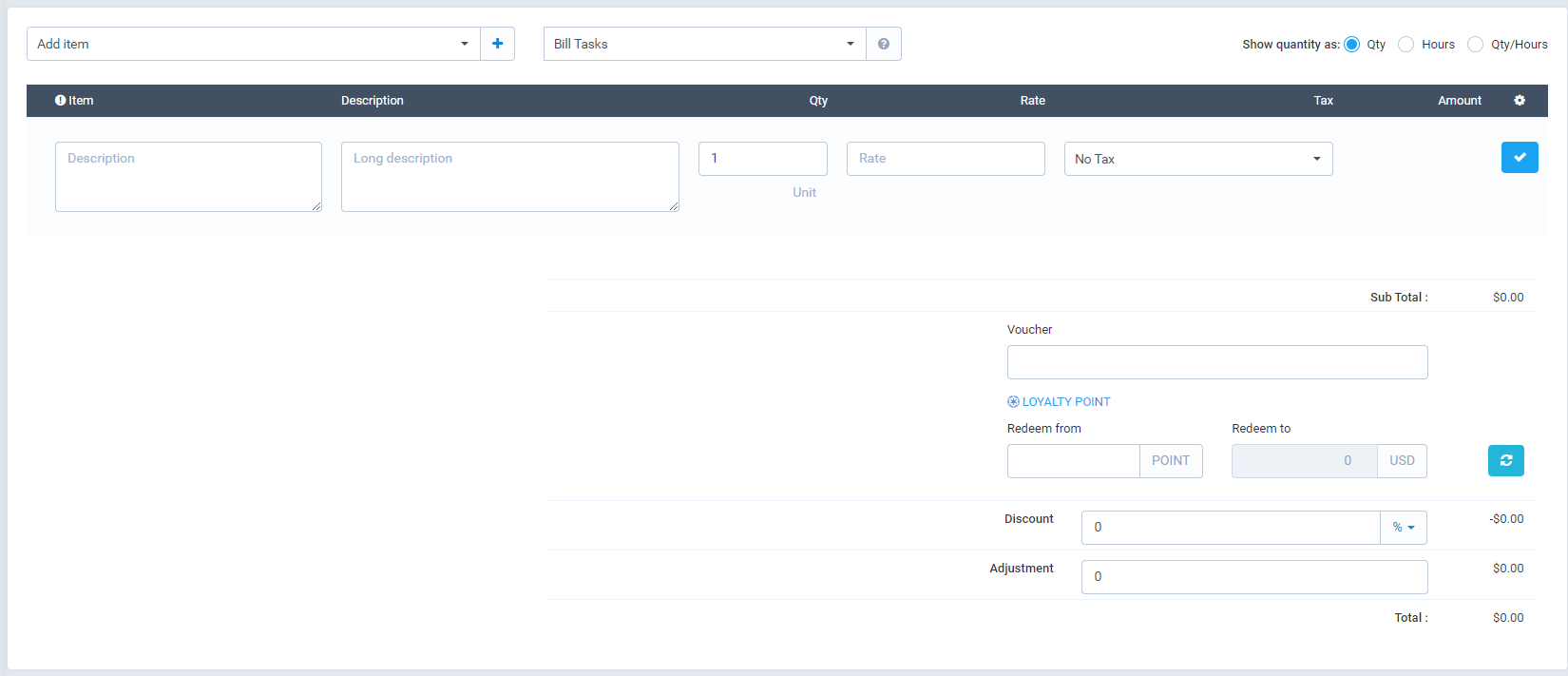
Once again, thank you so much for subscribing this module. We will be glad to help you if you have any questions relating to this module.
Applify Technologies